When a subscriber recommends your store to a friend, the reward should fit the way they already shop with you. For many subscription customers, that means using it on an upcoming delivery.
A coupon that works at a new checkout can still leave an existing subscriber wondering where to use it, so it is crucial to set up that part of the experience before asking customers to share.
ReferralCandy supports coupon offers on Shopify subscription products, and connecting Recharge lets customers apply earned reward codes to eligible existing subscriptions through the Recharge Customer Portal. This guide covers Recharge's Shopify Checkout Integration.
Start with where your customer will use the reward
A new customer and the subscriber who recommended you take different routes:
| Who's using the offer? | Where it needs to work |
|---|---|
| A referred friend starting a subscription. | The friend offer applies to the intended product at Shopify checkout. |
| An existing subscriber who earned a referral reward. | The reward code can be applied to their subscription through the Recharge Customer Portal. |
Connect ReferralCandy to Recharge

- With both apps installed, open ReferralCandy → Integrations → Recurring payments from Shopify.
- Select Connect under Recharge and complete the authorization.
- Check and re-save your campaign's reward settings. Connecting Recharge can reset that configuration.
- In Recharge, open Storefront → Customer Portal, enable Discounts, and save.
The Recharge connection guide has the full instructions: After a qualifying referral, the customer receives a reward code by email and applies it to an eligible subscription. It is important to make that step clear in the email so they know how to use what they've earned.
Decide how long the discount lasts
In your campaign's advocate reward or friend offer settings, choose an amount-off coupon and enable it for subscription apps. Select whether it applies to one-time purchases, subscriptions, or both.
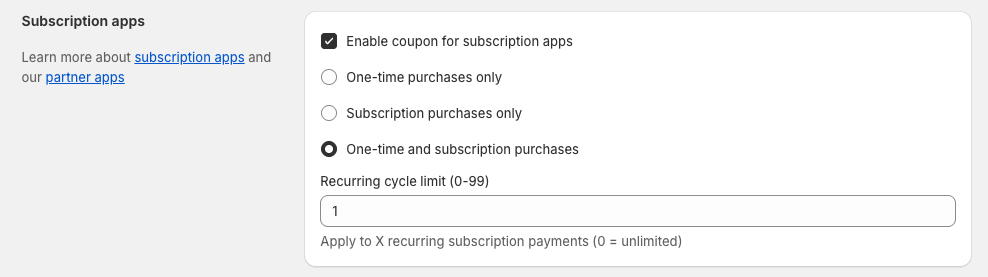
Then set the recurring cycle limit. A limit of 1 applies the discount to one billing cycle. A higher number extends it to that many cycles; 0 applies it indefinitely. The subscription coupon guide explains the settings.
Choose a duration your margins can support. If you promise a discount on one delivery, check that it ends when intended. If you offer an ongoing discount, include those future orders in your cost calculation.
Check renewal commissions separately
If creators will earn commissions on subscription renewals, agree on which orders count before they start promoting your products.
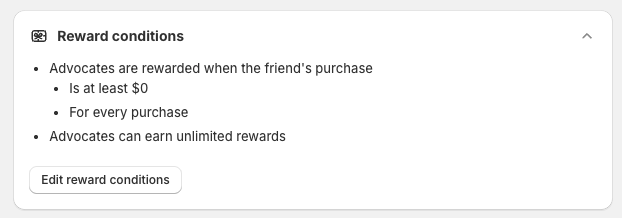
The coupon cycle limit controls the customer's discount. ReferralCandy's reward conditions control which referred purchases qualify for a reward: the first purchase, every purchase, or a specified number of purchases.
Put the confirmed rules in your creator agreement, including refunds, the review period, and payment timing. Our creator commissions guide walks through those decisions.
Give subscribers a clear route to their rewards
Customers should be able to find their referral link, see what they've earned, and understand where to use it.
The customer referral details extension shows referral links and reward history in Shopify's new customer accounts, and customers can apply their subscription reward code separately in the Recharge Customer Portal.
Explain that route in the reward email: open your subscription, enter this code, and apply it to an eligible order. Call it a reward code so customers know they need to use it; “account credit” could suggest the next bill will change automatically.
Follow one referral all the way through
Before inviting customers, use the campaign testing instructions to arrange these checks:
- Complete an eligible referred subscription purchase and confirm attribution.
- Apply the earned reward to an existing subscription.
- Check eligible products, discount combinations, and the next billing cycle.
- If you offer renewal commissions, verify a renewal's tracking and reward eligibility separately.
The customer who brought you a friend has already done their part! Now make the next step easy: a reward they can use, with instructions that match how their subscription works.


