
There are endless marketing strategies out there for promoting your business, products, or services, and of course your referral program. But have you tried using an email drip campaign?
An email drip campaign is a seamless tactic for nurturing subscribers into taking the action that you want them to take. It involves email workflows and automation to get set up, but then you can let it go on its own, nurturing leads into becoming customers or nurturing customers into becoming loyal referrers.
Throughout this article, we’re going to dive deeper into what an email drip campaign is, why they’re so powerful, how you can create one, and more.
What is an Email Drip Campaign?
An email drip campaign, or just drip campaign, is a series of automated emails that are sent to a group of people at a pre-set interval.
For example, email automation tool Drip shared this template for an email drip campaign that might go out after someone has made a purchase. The sequence first sends a thank you email before sharing more products the customer might enjoy based on their purchase and finally asking for feedback or a review.
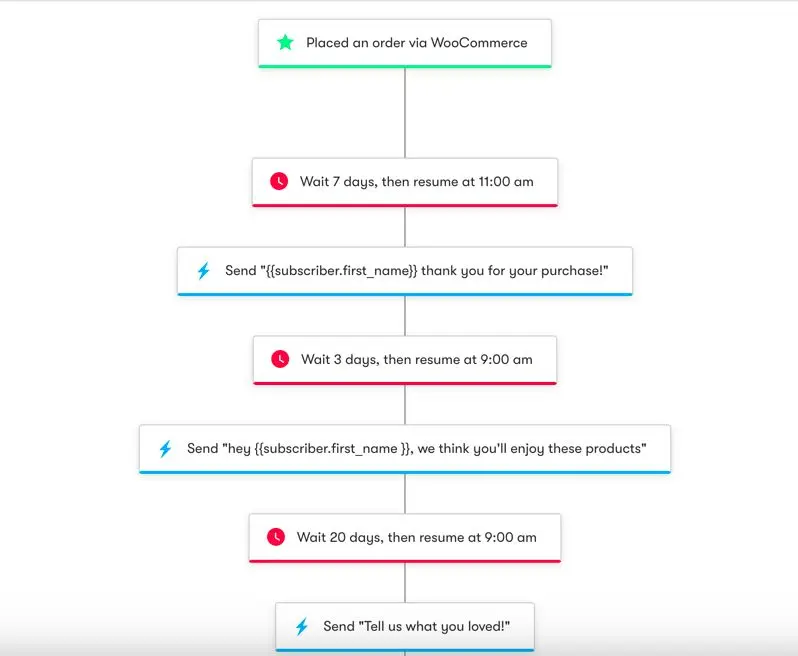
These drip campaigns are typically triggered by a specific event. In the case of a referral drip campaign, your trigger might be a customer’s second or third purchase. Obviously, they love your company and are return shoppers; they may as well get benefits for referring your brand to others.
Benefits of an Email Drip Campaign
There are a number of reasons why you should incorporate drip campaigns into your email marketing strategy. Let’s walk through some of the biggest benefits and how your next big drip campaign could help.
Create Better-Performing Emails
Drip campaign emails are known to do better than their single-email counterparts. In some instances, drip emails receive a 45% click-through rate compared to 21% for regular marketing emails. Drip campaigns also tend to see higher open rates as well as conversion rates.
Re-Engage Past Customers
Drip campaigns are great at re-engaging past customers and getting them interested in your business again. Because they’re designed as little “check-ins,” they’re non-intrusive and do a great job of simply reminding your customers that you exist.
Generate Action
Email drip campaigns also do a great job of nurturing recipients and getting them to take the action you’re looking for—in this case, joining your referral program and sending their friends and family in your direction.
Types of Email Drip Campaigns
Email drip campaigns can be used in a number of different ways, from nurturing potential leads and educating your audience about a certain topic or feature all the way to encouraging repeat purchases and, of course, introducing a referral program.
Here are a few of the most popular types of email drip campaigns brands might want to create.
Welcome Sequences
There are two types of welcome sequences you’ll want to create—the first is when someone first subscribes to your email list and the second is when someone makes their first purchase.
(Keep in mind that these might be triggered around the same time, especially if your opt-in is a discount and they want to use it for their order. In this instance, you’ll want to make sure the new customer email sequence supersedes the new subscriber sequence so they’re not bombarded by emails.)
Use these series’ to introduce your brand to the new subscriber or customers alongside your most popular products. You might also consider offering a discount code for the consumer’s first or next purchase.
Lead Nurturing
Lead nurturing is the process of facilitating a relationship with potential customers in the hopes that they’ll become a customer. These campaigns are one of the best ways to convert leads in the shortest time frame by introducing your business and the problems that your products can solve.
A lead nurturing campaign is one of the most common drip campaigns you’ll see. While we’re focusing more on referral marketing, keep this strategy in your back pocket. You may want to create your own lead-nurturing drip email campaign in the future.
Educational
If you’re launching an educational product like an online course or hosting an educational event like a virtual conference or webinar, creating an educational drip campaign can be a great way to increase students, customers, or attendees.
Start off by introducing your educational product or event then spend the next several emails detailing what people will learn, notable speakers to learn from, and how the information can help recipients in their jobs or day-to-day tasks. To help attendees retain more from live sessions, consider mentioning supportive tools like an AI meeting note taker, which can automatically capture key insights and action points.
Abandoned Carts
Abandoned cart emails are one of the most popular types of ecommerce drip campaigns. These are triggered by someone adding a product to their shopping cart but not finalizing their purchase. Brands will then send out an email sequence enticing shoppers to make their way back to the shopping cart and complete their purchase.
Cross-Sell or Up-Sell
Once someone has made a purchase, it’s much easier to get them to make another purchase. Thus, many brands choose to create a cross-sell or up-sell drip email campaign in order to bring customers back and get them to make another purchase—especially if it’s a more expensive purchase.
A cross-sell email campaign promotes products similar to and compatible with the product(s) a customer has already purchased. These might be around the same price point. Whereas an up-sell email campaign promotes products that might be deemed an upgrade that are at a higher price point in an attempt to increase your customer lifetime value (CLV).
Referral Marketing
And finally, referral marketing. Brands can create an email drip campaign that they send out to new and existing customers promoting their referral program and the perks that customers can get from it.
Referral email drip campaigns may even intertwine with some of the other types of drip campaigns we mentioned. For example, you might start with a “Thank You!” email after someone’s first purchase before diving into a cross-sell email before finally introducing your referral program.
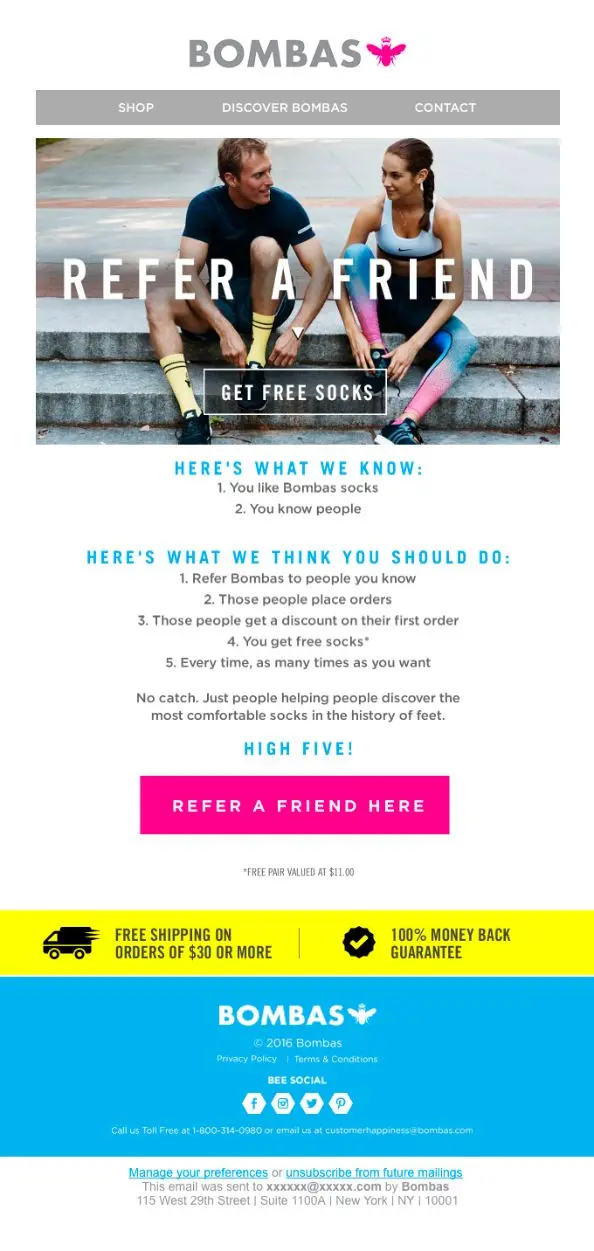
Here’s a great example of one of the emails you might include within your sequence that shares all sorts of information about your referral program and how to get perks.

How to Create an Email Drip Campaign for Referral Marketing
Now let’s get into the good stuff—how you can create your own email drip campaign to ramp up the number of customers you have in your referral program.
1. Pinpoint Your Goal(s)
The first thing you need to do when creating an email drip campaign is to pinpoint your goal(s). This will typically coincide with the type of drip campaign you’re running.
For example, your goals for a referral marketing drip campaign might include:
- Increasing the number of loyal customers who share word of your business
- Increasing the number of new customers who were referred to your business
It’s one thing for your customers to share your business with their friends and family—but it’s another to see ROI from those referrals by way of new customers.
2. Select a Trigger
One of the main elements of a drip email campaign is that it’s typically set off by a trigger. By the end of this step-by-step guide, you’ll have the entire workflow in your email marketing platform of choice—and it will start with your selected trigger.
Common triggers for a referral marketing campaign include:
- A customer makes their first purchase
- A customer makes a secondary purchase
- A customer hits the one-year anniversary of their first purchase
The latter two are likely your best bet for getting a loyal customer to refer your business to other people. However, you can still create a strategic drip campaign after an initial purchase and entice the new customer to join your referral program.
3. Identify Your Target Audience
Here, you can whittle down your audience a bit more. For example, you might narrow down your target audience so the email trigger only sends to customers who bought a specific type of product, customers who spent $100 or more, or another specific segment of new or returning customers.
Or you could stick to the entire audience segment that the trigger would select. It all depends on your goals and how likely various sets of customers would be to refer your business.
Typically, referral software like ReferralCandy have readily available customizable options that allow you to identify and segment your customers according to certain criteria. Our upgraded integration with Klaviyo provides users with numerous new triggers that they can add to their referral email campaign workflows to create a more personalized journey for their customers.
4. Decide How Many Emails to Send
How many emails will you include within your drip campaign? Best practices dictate that your drip campaign should be anywhere from four to 11 emails, each sent 7-14 days apart from the next.
Consider how you want to lay out your email content. For example, you might choose to send just four emails that follow this structure:
- Email 1: Thank your customer for their purchase
- Email 2: Ask the customer for feedback on your product
- Email 3: Promote complementary products and do a brief introduction to your referral program
- Email 4: Share a full explanation of the benefits and perks of your referral program and a CTA to join
Or, if you discover you want to share more information about your business or referral perks, you can break it down into even more emails.
5. Write Your Email Copy
Next, you’ll need to write the copy for each email you’re placing in the sequence. Start with the first email and write them all in order so you can avoid leaving pertinent information out.
Make sure to write out a subject line, preview text, and body copy for each email you’re including in the campaign. You may even want to A/B test certain pieces of your campaign to see which performs the best.
6. Create Your Campaign Workflow
Next, you’ll need to build out your campaign within your email marketing tool. Make sure your email platform of choice has automation features that let you set a trigger and space out each email in your drip campaign.
Most drip campaign makers have drag-and-drop tools that let you drag the initial trigger, each email, and each timing mechanism into the workflow. You can then input your email copy, select your trigger and audience, and get your campaign ready to launch.
7. Launch Your Email Drip Campaign
Finally, you’re ready to deploy your email drip campaign. Because it’s a sequence of emails that will be sent over the span of several weeks or even months, it will take a while before you can measure the results.
Keep an eye on how many opens and clicks each email in your sequence gets, especially compared to your typical email marketing open and click rates. Make sure you’re not getting negative feedback like spam reports and unsubscribes.
Over time, you may find you need to adapt certain emails in the sequence, add a couple of emails, or even remove some. Keep an eye on your results as your first few customers finish up the segment to see if you’re getting more customers in your referral program or if you’re starting to see new purchases using referral codes and links.
Use Email Marketing for Your Referral Program
Create your first email drip campaign and increase the number of customers you have in your referral program. Word-of-mouth is one of the strongest marketing strategies, and having more customers share your business with their friends can help your company grow. Discover what great referral email campaigns look like so you know where to start.